pyaibox.base package
Submodules
pyaibox.base.arrayops module
- pyaibox.base.arrayops.arraycomb(arrays, out=None)
compute the elemnts combination of several lists.
- Parameters
- Returns
The combination results.
- Return type
numpy array
Examples:
Compute the combination of three lists: \([1,2,3]\), \([4, 5]\), \([6,7]\), this will produce a \(12\times 3\) array.
x = arraycomb(([1, 2, 3], [4, 5], [6, 7]))
print(x, x.shape)

# output:
[[1 4 6]
[1 4 7]
[1 5 6]
[1 5 7]
[2 4 6]
[2 4 7]
[2 5 6]
[2 5 7]
[3 4 6]
[3 4 7]
[3 5 6]
[3 5 7]] (12, 3)
- pyaibox.base.arrayops.cat(arrays, axis=None, out=None)
- pyaibox.base.arrayops.cut(x, pos, axis=None)
Cut array at given position.
Cut array at given position.
- pyaibox.base.arrayops.sl(dims, axis, idx=None)
slice any axis
generates slice of specified axis.
- Parameters
- Returns
slice for specified axis elements.
- Return type
Examples
import numpy as np

np.random.seed(2020)
X = np.random.randint(0, 100, (9, 10))
print(X, 'X)
print(X[sl(2, -1, [0, 1])], 'Xsl')

# output:

[[96  8 67 67 91  3 71 56 29 48]
[32 24 74  9 51 11 55 62 67 69]
[48 28 20  8 38 84 65  1 79 69]
[74 73 62 21 29 90  6 38 22 63]
[21 68  6 98  3 20 55  1 52  9]
[83 82 65 42 66 55 33 80 82 72]
[94 91 14 14 75  5 38 83 99 10]
[80 64 79 30 84 22 46 26 60 13]
[24 63 25 89  9 69 47 89 55 75]] X
[[96  8]
[32 24]
[48 28]
[74 73]
[21 68]
[83 82]
[94 91]
[80 64]
[24 63]] Xsl
pyaibox.base.baseops module
- pyaibox.base.baseops.dmka(D, Ds)
Multi-key value assign
Multi-key value assign
- pyaibox.base.baseops.dreplace(d, fv=None, rv='None', new=False)
- pyaibox.base.baseops.redim(ndim, dim, cdim, keepcdim)
re-define dimensions
- Parameters
ndim (int) – the number of dimensions
cdim (int, optional) – If data is complex-valued but represented as real tensors, you should specify the dimension. Otherwise, set it to None, defaults is None. For example, \({\bm X}_c\in {\mathbb C}^{N\times C\times H\times W}\) is represented as a real-valued tensor \({\bm X}_r\in {\mathbb R}^{N\times C\times H\times W\ times 2}\), then
cdimequals to -1 or 4.keepcdim (bool) – If
True, the complex dimension will be keeped. Only works whenXis complex-valued tensor but represents in real format. Default isFalse.
- Returns
re-defined dimensions
- Return type
- pyaibox.base.baseops.strfind(mainstr, patnstr)
find all patterns in string
- pyaibox.base.baseops.upkeys(D, mode='-', k='module.')
update keys of a dictionary
- Parameters
- Returns
new dictionary with keys updated
- Return type
pyaibox.base.mathops module
- pyaibox.base.mathops.abs(X, caxis=None, keepaxis=False)
obtain amplitude of a array
Both complex and real representation are supported.
\[{\rm abs}({\bf X}) = |{\bf x}| = \sqrt{u^2 + v^2}, x\in {\bf X} \]where, \(u, v\) are the real and imaginary part of x, respectively.
- Parameters
X (array) – input
caxis (int or None) – If
Xis complex-valued,cdimis ignored. IfXis real-valued andcdimis integer thenXwill be treated as complex-valued, in this case,cdimspecifies the complex axis; otherwise (None),Xwill be treated as real-valuedkeepaxis (bool, optional) – keep complex-dimension?
- Returns
the inputs’s amplitude.
- Return type
array
Examples
np.random.seed(2020)
X = np.random.rand(2, 3, 3)

print('---abs')
print(abs(X, caxis=0))
print(abs(X[0] + 1j * X[1]))

# ---output
---abs
[[0.99864747 0.88468226 0.91269439]
[0.78490066 0.48990863 0.40424448]
[0.72184896 0.40619981 1.02884318]]
[[0.99864747 0.88468226 0.91269439]
[0.78490066 0.48990863 0.40424448]
[0.72184896 0.40619981 1.02884318]]
- pyaibox.base.mathops.c2r(X, caxis=-1, keepaxis=False)
convert complex-valued array to real-valued array
- Parameters
:param otherwise concatenates the real and imag part at exist dimension
cdim: :type otherwise concatenates the real and imag part at exist dimensioncdim: Default isFalse:param : :type : Default isFalse- Returns
output in real representaion
- Return type
numpy array
see also
r2c()Examples
import numpy as np

np.random.seed(2020)

Xreal = np.random.randint(0, 30, (3, 2, 4))
Xcplx = r2c(Xreal, caxis=1)
Yreal = c2r(Xcplx, caxis=0, keepaxis=True)

print(Xreal, Xreal.shape, 'Xreal')
print(Xcplx, Xcplx.shape, 'Xcplx')
print(Yreal, Yreal.shape, 'Yreal')
print(np.sum(Yreal[0] - Xcplx.real), np.sum(Yreal[1] - Xcplx.imag), 'Error')

# output
[[[ 0  8  3 22]
[ 3 27 29  3]]

[[ 7 24 29 16]
[ 0 24 10  9]]

[[19 11 23 18]
[ 3  6  5 16]]] (3, 2, 4) Xreal

[[[ 0. +3.j  8.+27.j  3.+29.j 22. +3.j]]

[[ 7. +0.j 24.+24.j 29.+10.j 16. +9.j]]

[[19. +3.j 11. +6.j 23. +5.j 18.+16.j]]] (3, 1, 4) Xcplx

[[[[ 0.  8.  3. 22.]]

[[ 7. 24. 29. 16.]]

[[19. 11. 23. 18.]]]


[[[ 3. 27. 29.  3.]]

[[ 0. 24. 10.  9.]]

[[ 3.  6.  5. 16.]]]] (2, 3, 1, 4) Yreal

0.0 0.0, Error
- pyaibox.base.mathops.conj(X, caxis=None)
conjugates a array
Both complex and real representation are supported.
- Parameters
X (array) – input
caxis (int or None) – If
Xis complex-valued,cdimis ignored. IfXis real-valued andcdimis integer thenXwill be treated as complex-valued, in this case,cdimspecifies the complex axis; otherwise (None),Xwill be treated as real-valued
- Returns
the inputs’s conjugate matrix.
- Return type
array
Examples
np.random.seed(2020)
X = np.random.rand(2, 3, 3)

print('---conj')
print(conj(X, caxis=0))
print(conj(X[0] + 1j * X[1]))

# ---output
---conj
[[[ 0.98627683  0.87339195  0.50974552]
[ 0.27183571  0.33691873  0.21695427]
[ 0.27647714  0.34331559  0.86215894]]

[[-0.15669967 -0.14088724 -0.75708028]
[-0.73632492 -0.35566309 -0.34109302]
[-0.66680305 -0.21710064 -0.56142698]]]
[[0.98627683-0.15669967j 0.87339195-0.14088724j 0.50974552-0.75708028j]
[0.27183571-0.73632492j 0.33691873-0.35566309j 0.21695427-0.34109302j]
[0.27647714-0.66680305j 0.34331559-0.21710064j 0.86215894-0.56142698j]]
- pyaibox.base.mathops.db2mag(db, s=20.0)
Converts decibel values to magnitudes
\[{\rm mag} = 10^{db / s} \]
- pyaibox.base.mathops.ebeo(a, b, op='+')
element by element operation
Element by element operation.
- Parameters
op (str, optional) – Supported operations are: -
'+'or'add'for addition (default) -'-'or'sub'for substraction -'*'or'mul'for multiplication -'/'or'div'for division -'**'orpowfor power -'<', or'lt'for less than -'<=', or'le'for less than or equal to -'>', or'gt'for greater than -'>=', or'ge'for greater than or equal to -'&'for bitwise and -'|'for bitwise or -'^'for bitwise xor - function for custom operation.
- Raises
TypeError – If the specified operator not in the above list, raise a TypeError.
- pyaibox.base.mathops.ematmul(A, B, **kwargs)
Element-by-element complex multiplication
like A .* B in matlab
- Parameters
A (array) – any size array, both complex and real representation are supported. For real representation, the real and imaginary dimension is specified by
cdimorcaxis.B (array) – any size array, both complex and real representation are supported. For real representation, the real and imaginary dimension is specified by
cdimorcaxis.cdim (int or None, optional) – if
AandBare complex arrays but represented in real format,cdimorcaxisshould be specified (Default isNone).
- Returns
result of element-by-element complex multiplication with the same repesentation as
AandB.- Return type
tensor
Examples
np.random.seed(2020)
Ar = np.random.randn(3, 3, 2)
Br = np.random.randn(3, 3, 2)

Ac = pb.r2c(Ar)
Bc = pb.r2c(Br)

Mr = pb.c2r(Ac * Bc)
print(np.sum(Mr - ematmul(Ar, Br, cdim=-1)))
print(np.sum(Ac * Bc - ematmul(Ac, Bc)))

# output
tensor(0)
tensor(0j)
- pyaibox.base.mathops.fnab(n)
gives the closest two integer number factor of a number
Examples
print(fnab(5))
print(fnab(6))
print(fnab(7))
print(fnab(8))
print(fnab(9))

# ---output
(2, 3)
(2, 3)
(2, 4)
(2, 4)
(3, 3)
- pyaibox.base.mathops.imag(X, caxis=None, keepaxis=False)
obtain imaginary part of a array
Both complex and real representation are supported.
- Parameters
X (array) – input
caxis (int or None) – If
Xis complex-valued,cdimis ignored. IfXis real-valued andcdimis integer thenXwill be treated as complex-valued, in this case,cdimspecifies the complex axis; otherwise (None),Xwill be treated as real-valuedkeepaxis (bool, optional) – keep complex-dimension?
- Returns
the inputs’s imaginary part array.
- Return type
array
Examples
np.random.seed(2020)
X = np.random.rand(2, 3, 3)

print('---imag')
print(imag(X, caxis=0))
print(imag(X[0] + 1j * X[1]))

# ---output
---imag
[[0.15669967 0.14088724 0.75708028]
[0.73632492 0.35566309 0.34109302]
[0.66680305 0.21710064 0.56142698]]
[[0.15669967 0.14088724 0.75708028]
[0.73632492 0.35566309 0.34109302]
[0.66680305 0.21710064 0.56142698]]
- pyaibox.base.mathops.mag2db(mag, s=20.0)
Converts decibel values to magnitudes
\[{\rm db} = s*{\rm log10}{\rm mag} \]
- pyaibox.base.mathops.matmul(A, B, **kwargs)
Complex matrix multiplication
like A * B in matlab
- Parameters
A (tensor) – any size tensor, both complex and real representation are supported. For real representation, the real and imaginary dimension is specified by
cdimorcaxis.B (tensor) – any size tensor, both complex and real representation are supported. For real representation, the real and imaginary dimension is specified by
cdimorcaxis.cdim (int or None, optional) – if
AandBare complex tensors but represented in real format,cdimorcaxisshould be specified (Default isNone).
- Returns
result of complex multiplication with the same repesentation as
AandB.- Return type
tensor
Examples
np.random.seed(2020)
Ar = np.random.randn(3, 3, 2)
Br = np.random.randn(3, 3, 2)

Ac = pb.r2c(Ar)
Bc = pb.r2c(Br)

print(np.sum(np.matmul(Ac, Bc) - matmul(Ac, Bc)))
Mr = matmul(Ar, Br, cdim=-1)
Mc = pb.c2r(np.matmul(Ac, Bc))
print(np.sum(Mr - Mc))

# output
tensor(0j)
tensor(0)
- pyaibox.base.mathops.nextpow2(x)
get the next higher power of 2.
Given an number \(x\), returns the first p such that \(2^p >=|x|\).
Examples
print(prevpow2(-5), nextpow2(-5))
print(prevpow2(5), nextpow2(5))
print(prevpow2(0.3), nextpow2(0.3))
print(prevpow2(7.3), nextpow2(7.3))
print(prevpow2(-3.5), nextpow2(-3.5))

# output
2 3
2 3
-2 -1
2 3
1 2
- pyaibox.base.mathops.pow(X, caxis=None, keepaxis=False)
obtain power of a array
Both complex and real representation are supported.
\[{\rm pow}({\bf X}) = |{\bf x}| = u^2 + v^2, x\in {\bf X} \]where, \(u, v\) are the real and imaginary part of x, respectively.
- Parameters
X (array) – input
caxis (int or None) – If
Xis complex-valued,cdimis ignored. IfXis real-valued andcdimis integer thenXwill be treated as complex-valued, in this case,cdimspecifies the complex axis; otherwise (None),Xwill be treated as real-valuedkeepaxis (bool, optional) – keep complex-dimension?
- Returns
the inputs’s power.
- Return type
array
Examples
np.random.seed(2020)
X = np.random.rand(2, 3, 3)

print('---pow')
print(pow(X, caxis=0))
print(pow(X[0] + 1j * X[1]))

# ---output
---pow
[[0.99729677 0.78266271 0.83301105]
[0.61606904 0.24001046 0.1634136 ]
[0.52106592 0.16499828 1.05851829]]
[[0.99729677 0.78266271 0.83301105]
[0.61606904 0.24001046 0.1634136 ]
[0.52106592 0.16499828 1.05851829]]
- pyaibox.base.mathops.prevpow2(x)
get the previous lower power of 2.
Given an number \(x\), returns the first p such that \(2^p <=|x|\).
Examples
print(prevpow2(-5), nextpow2(-5))
print(prevpow2(5), nextpow2(5))
print(prevpow2(0.3), nextpow2(0.3))
print(prevpow2(7.3), nextpow2(7.3))
print(prevpow2(-3.5), nextpow2(-3.5))

# output
2 3
2 3
-2 -1
2 3
1 2
- pyaibox.base.mathops.r2c(X, caxis=-1, keepaxis=False)
convert real-valued array to complex-valued array
Convert real-valued array (the size of
axis-th dimension is 2) to complex-valued array- Parameters
:param otherwise preserves the axis
cdim: :type otherwise preserves the axiscdim: Default isFalse:param : :type : Default isFalse:param (only work when the dimension atcdimequals 2):- Returns
complex-valued array
- Return type
numpy array
Examples
import numpy as np

np.random.seed(2020)

Xreal = np.random.randint(0, 30, (3, 2, 4))
Xcplx = r2c(Xreal, caxis=1)
Yreal = c2r(Xcplx, caxis=0, keepaxis=True)

print(Xreal, Xreal.shape, 'Xreal')
print(Xcplx, Xcplx.shape, 'Xcplx')
print(Yreal, Yreal.shape, 'Yreal')
print(np.sum(Yreal[0] - Xcplx.real), np.sum(Yreal[1] - Xcplx.imag), 'Error')

# output
[[[ 0  8  3 22]
[ 3 27 29  3]]

[[ 7 24 29 16]
[ 0 24 10  9]]

[[19 11 23 18]
[ 3  6  5 16]]] (3, 2, 4) Xreal

[[[ 0. +3.j  8.+27.j  3.+29.j 22. +3.j]]

[[ 7. +0.j 24.+24.j 29.+10.j 16. +9.j]]

[[19. +3.j 11. +6.j 23. +5.j 18.+16.j]]] (3, 1, 4) Xcplx

[[[[ 0.  8.  3. 22.]]

[[ 7. 24. 29. 16.]]

[[19. 11. 23. 18.]]]


[[[ 3. 27. 29.  3.]]

[[ 0. 24. 10.  9.]]

[[ 3.  6.  5. 16.]]]] (2, 3, 1, 4) Yreal

0.0 0.0, Error
- pyaibox.base.mathops.real(X, caxis=None, keepaxis=False)
obtain real part of a array
Both complex and real representation are supported.
- Parameters
X (array) – input
caxis (int or None) – If
Xis complex-valued,cdimis ignored. IfXis real-valued andcdimis integer thenXwill be treated as complex-valued, in this case,cdimspecifies the complex axis; otherwise (None),Xwill be treated as real-valuedkeepaxis (bool, optional) – keep complex-dimension?
- Returns
the inputs’s real part array.
- Return type
array
Examples
np.random.seed(2020)
X = np.random.rand(2, 3, 3)

print('---real')
print(real(X, caxis=0))
print(real(X[0] + 1j * X[1]))

# ---output
---real
[[0.98627683 0.87339195 0.50974552]
[0.27183571 0.33691873 0.21695427]
[0.27647714 0.34331559 0.86215894]]
[[0.98627683 0.87339195 0.50974552]
[0.27183571 0.33691873 0.21695427]
[0.27647714 0.34331559 0.86215894]]
pyaibox.base.randomfunc module
- pyaibox.base.randomfunc.randgrid(start, stop, step, shake=0, n=None)
generates non-repeated uniform stepped random integers
Generates
nnon-repeated random integers fromstarttostopwith step sizestep.When step is 1 and shake is 0, it works similar to randperm,
- Parameters
- Return type
for multi-dimension, return a list of lists, for 1-dimension, return a list of numbers.
see
randperm().Example
Plot sampled randperm and randgrid point.
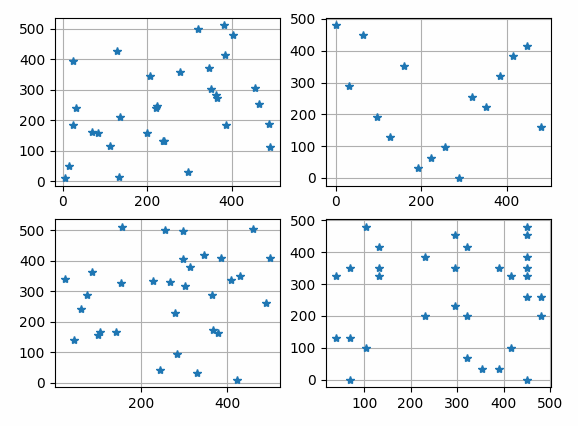
The results shown in the above figure can be obtained by the following codes.
import matplotlib.pyplot as plt

setseed(2021)
print(randperm(2, 40, 8), ", randperm(2, 40, 8)")
print(randgrid(2, 40, 1, -1., 8), ", randgrid(2, 40, 1, 8, -1.)")
print(randgrid(2, 40, 6, -1, 8), ", randgrid(2, 40, 6, 8)")
print(randgrid(2, 40, 6, 0.5, 8), ", randgrid(2, 40, 6, 8, 0.5)")
print(randgrid(2, 40, 6, -1, 12), ", randgrid(2, 40, 6, 12)")
print(randgrid(2, 40, 6, 0.5, 12), ", randgrid(2, 40, 6, 12, 0.5)")

mask = np.zeros((5, 6))
mask[3, 4] = 0
mask[2, 5] = 0

Rh, Rw = randperm2d(5, 6, 4, mask=mask)

print(Rh)
print(Rw)

N, H, W = 32, 512, 512

y1 = pb.randperm(0, H, N)
x1 = pb.randperm(0, W, N)
print(len(y1), len(x1))

y2 = pb.randgrid(0, H, 32, 0., N)
x2 = pb.randgrid(0, W, 32, 0., N)
print(len(y2), len(x2))
print(y2, x2)

y3, x3 = pb.randperm([0, 0], [H, W], N)
print(len(y3), len(x3))

y4, x4 = pb.randgrid([0, 0], [H, W], [32, 32], [0.25, 0.25], N)
print(len(y4), len(x4))

plt.figure()
plt.subplot(221)
plt.grid()
plt.plot(x1, y1, '*')
plt.subplot(222)
plt.grid()
plt.plot(x2, y2, '*')
plt.subplot(223)
plt.grid()
plt.plot(x3, y3, '*')
plt.subplot(224)
plt.grid()
plt.plot(x4, y4, '*')
plt.show()
- pyaibox.base.randomfunc.randperm(start, stop, n)
randperm function like matlab
genarates diffrent random interges in range [start, stop)
- Parameters
- Returns
P (list) – the randomly permuted intergers.
see
randgrid(),randperm2d().
- pyaibox.base.randomfunc.randperm2d(H, W, number, population=None, mask=None)
randperm 2d function
genarates diffrent random interges in range [start, end)
- Parameters
- Returns
Ph (list) – the randomly permuted intergers in height direction.
Pw (list) – the randomly permuted intergers in width direction.
see
randgrid(),randperm().
pyaibox.base.typevalue module
- pyaibox.base.typevalue.dtypes(t='int')
- pyaibox.base.typevalue.peakvalue(A)
Compute the peak value of the input.
Find peak value in matrix
- Parameters
A (numpy array) – Data for finding peak value
- Returns
Peak value.
- Return type
number